A more tactile way to shape playback
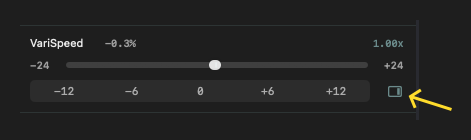
VariSpeed now gets an optional pitch control sidebar that feels closer to a turntable than a plain slider. I added it as an extra control strip you can enable from the Environment toolbar menu, so it stays out of the way until you actually want it.
The idea is simple: when you are working with pitch, timing, or subtle playback adjustments, the control should feel immediate and readable. The new sidebar gives VariSpeed a more physical presence, with a vertical strip and a clearer visual rhythm for fine tuning.
Vinyl Start and Stop effects
I also added Vinyl Start/Stop effects to the same sidebar. These let you shape the motion of playback with adjustable torque and stop time, so the transport does not just start and stop - it can ease into those moves with a more record-player feel.
The controls are intentionally practical:
- Torque ranges from 3.8 to 4.6
- Stop time ranges from 0.2s to 6.0s
That gives enough room to dial in a subtle mechanical response without turning it into a gimmick. If you want a tighter, snappier feel, you can get there. If you want something more gradual and obviously vinyl-inspired, that is there too.
Start/Stop from the keyboard
I also added a playback menu shortcut for Vinyl Play/Pause: SHIFT + SPACE.
That matters more than it sounds like it should. When you are actively testing pitch behavior or comparing playback states, getting to play and pause without hunting through the UI keeps the whole flow much cleaner.
VariSpeed was already useful for pitch changes. This update makes it more expressive and always accessible. Instead of treating pitch control like a utility knob, I wanted it to feel like part of the listening experience - something visible, adjustable, and a little more musical.
